
🚀 New: Laxbel Pro supports more barcode formats & templates View Plans
Laxbel
Download

Label Design • Barcode • QR • Printing

Simple label design & printing — built for real work.

Laxbel helps factories, warehouses, and offices design and print labels in minutes. Create templates, connect data, generate barcodes/QR, and print perfectly aligned labels.
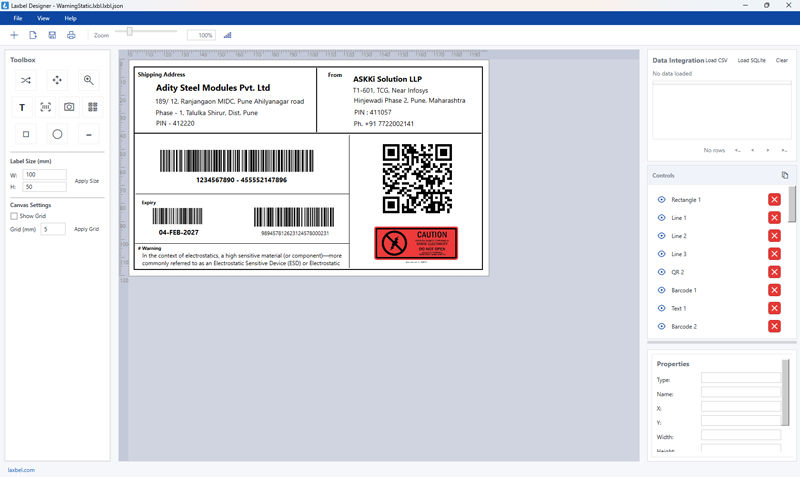

Fast & lightweight
🧩 Templates & data fields
🖨️ Print-ready output
Laxbel Designer
Laxbel software mockup
Print Alignment
Calibrated & precise
🔒
Licensing
Lite • Pro • Enterprise

Everything you need to design & print labels

Focused features that matter for daily operations.

🏷️

Template-based Design

Create label templates for products, cartons, pallets, assets, and more.

Barcode & QR

Generate common 1D/2D codes, including GS1-ready formats (as per your plan).

🗃️

Data Fields

Bind text/barcodes to data fields from CSV/Excel/API so printing becomes 1-click.

🎯

Accurate Printing

Control DPI, margins, paper size, and alignment for consistent output.

🖼️

Images & Logos

Add product images, brand logos, and compliance icons on labels.

⚙️

Industrial-friendly

Built to work for manufacturing, warehouse, dispatch, and service workflows.

Laxbel products

Choose what fits your operations and budget.

Laxbel Lite

For small teams starting label printing.

  • Core label designer
  • Basic 1D/2D barcodes
  • CSV import
  • Standard templates
See Pricing
Most Popular

Laxbel Pro

For daily industrial label workflows.

  • Advanced templates & variables
  • More barcode symbologies
  • Data binding + batch printing
  • Better alignment controls
Download Pro

Laxbel Enterprise

For multi-location, multi-user deployments.

  • Central license management
  • Role-based access
  • API integration
  • Priority support
Talk to Sales

Download Laxbel

Windows installer + documentation. (Replace links with your real file URLs.)

Version: 1.0.0
System: Windows 10/11 (64-bit)

Need a demo?

Get a quick walkthrough and label alignment setup help.

Request Demo

Already using ERP?

We can integrate label printing with your ERP/WMS/dispatch flow.

Ask Integration

Simple pricing

Transparent plans. Upgrade anytime.

Lite

₹—

Starter plan

  • Basic designer + printing
  • CSV import
  • Email support
Get Quote
Recommended

Pro

₹—

Best for factories

  • Advanced templates
  • More barcode types
  • Batch printing
  • Priority support
Get Pro

Enterprise

Custom

Large deployments

  • Multi-PC licensing
  • Central management
  • API integration
  • SLA support
Talk to Sales

Want “Lite vs Pro vs Enterprise” controlled by licensing? This website already matches that story.

FAQ

Quick answers for buyers and users.

Which printers does Laxbel support?
Laxbel works with standard Windows printers. For label printers, alignment depends on driver settings and label size configuration.
Can I print from Excel/CSV data?
Yes. You can map CSV columns to label fields and print multiple labels quickly.
Do you provide installation and alignment support?
Yes. We can help with installation, label sizes, DPI settings, and printer calibration.
Can Laxbel integrate with ERP/WMS?
Yes. Enterprise plan can support API-based printing workflows and data sync.

Contact

Share your label size, printer model, and sample label screenshot. We’ll suggest the best plan and setup.

What to send us

  • Label size (mm)
  • Printer model
  • Barcode/QR type required
  • Sample label image